
PowerPoint shortcuts

June 17, 2021

Share this post

Get places faster with this great list of PowerPoint shortcuts

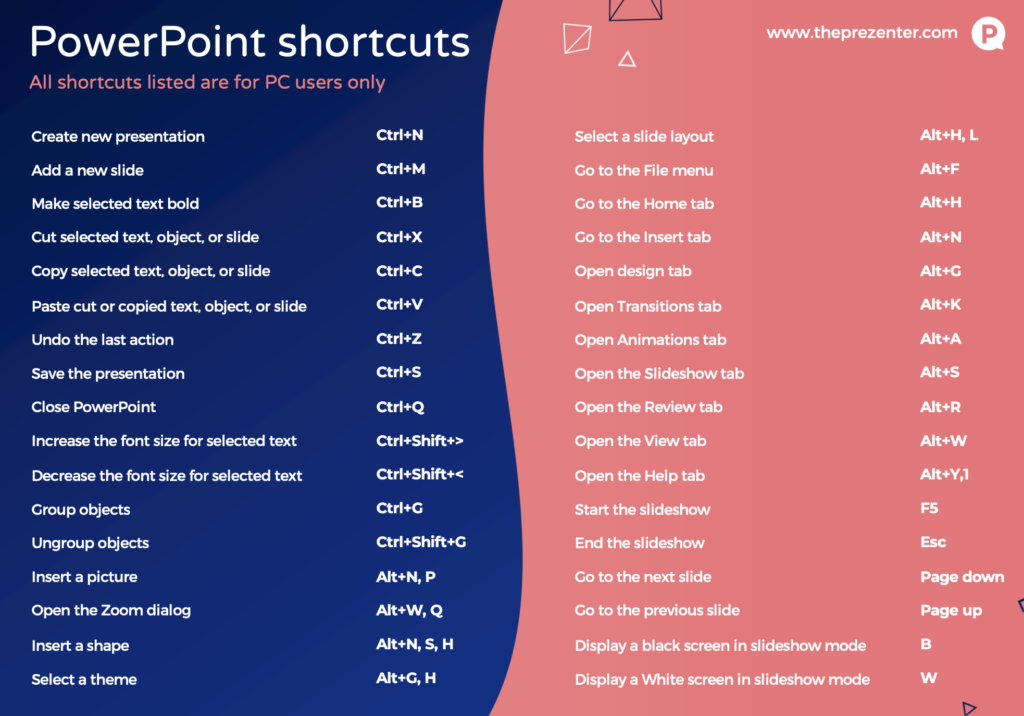
One thing we really try and help our clients with is optimising their use of PowerPoint. You can make the design and build process quicker and slicker by knowing what shortcuts to use. This can save you clicks, and less clicks means less time building a PowerPoint and more time doing the stuff that matters like rehearsing and getting a good night’s sleep before your big talk.

Click the image below to download a 1 page pdf with some of our design teams most used PowerPoint shortcuts.
If you’d like to discuss PowerPoint training for your business please contact us on [email protected]

More blogs

Using AI Imagery In PowerPoint

Have you heard of Mid Journey? Mid Journey is just one of the many AI Image generators you can access online. You are able…

How to make social media videos with PowerPoint

If you’d like to squeeze a bit more juice out of PowerPoint then we think you’ll like what we are about to suggest. Put…

10 Things 10 Years of PowerPoint Training Has Taught Me

I’ve spent a decade standing in front of corporate teams teaching PowerPoint. Some things have changed enormously. Most haven’t changed at all. Here’s what…

How to Use PowerPoint to Create an Interactive PDF

Did you know that PowerPoint can export a fully clickable PDF, complete with a working menu that jumps straight to the section someone wants,…